Home Artist Music Writing Library Sto Plains Lair 3D Printing Gear Evidence Grung3zilla Contact
← 3D Printing

3D Printing

3D Filament Tier List

Zack Freedman's ranking of the filaments every maker should know about, from his Voidstar Lab video — made hoverable.

▶ Watch Zack's video on YouTube Zack's filament links

Hover a boat for its details. Click it to pin the card so you can use the links.Tap a boat for its details. Every card is also listed below.

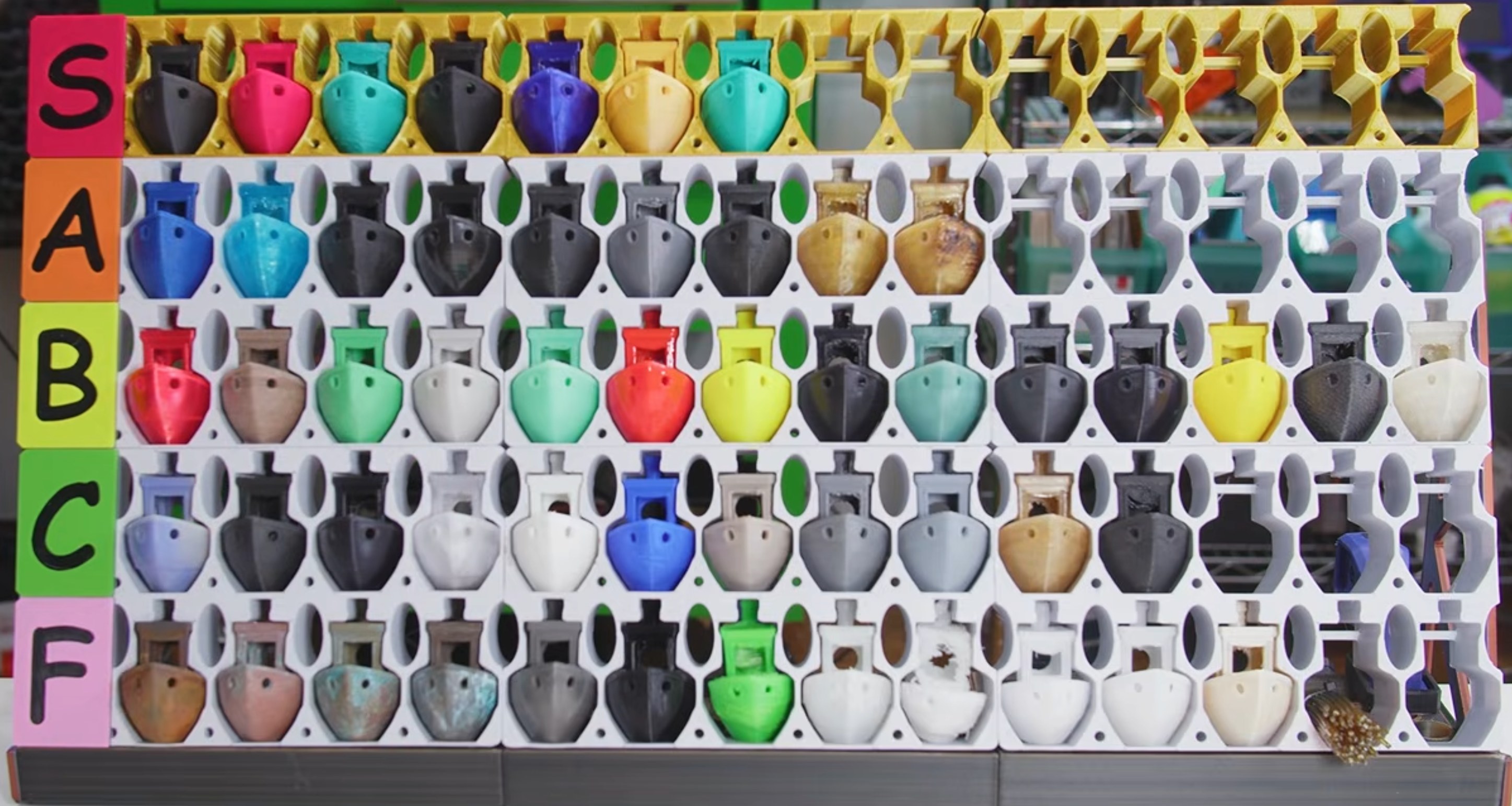
Zack Freedman's 3D-printed tier list rack: rows S, A, B, C, and F, each holding small test boats printed in a different filament.

Photo, rankings, and opinions: Zack Freedman / Voidstar Lab. Pros and cons paraphrase what Zack says in the video. Which boat is which follows the order he shelves them in; a few look-alike super-polymer boats (PPS, PES, PPSU) and the strand bundle standing in for TPI are best guesses — the “Watch at” button on each card jumps to that part of the video.

About the print settings

Zack only gives temperatures for a handful of these. Every other number is a starting point from the manufacturer page or slicer guide named on that card — not something Zack said and not something tested here. Brands and blends vary a lot; your spool's label wins.

S

Design your project around one of these if you possibly can.

S

Carbon Fiber PLA

Zack thinks this makes plain PLA hard to justify: the only reasons left are avoiding a nozzle swap and wanting colors.

Pros

  • Sharper details — the fibers stabilize the plastic as it cools
  • Low shrinkage and a matte finish: one of the best-looking, most accurate filaments
  • Stiffer parts

Cons

  • More brittle than plain PLA
  • Doesn't make parts stronger or lighter
  • Needs a hardened steel nozzle (he says the swap is cheap and easy)
  • Basically comes in black

Baseline print settings

Nozzle
190–230 °C
Bed
40–60 °C
Notes
Hardened nozzle, 0.4 mm or larger.

Settings source: MatterHackers filament comparison guide

S

“Tough” PLA (PLA + PBT)

A straight upgrade over PLA for almost any light-duty project. Zack means PLA blended with PBT — not just anything labeled “tough.”

Pros

  • Prints and behaves like PLA
  • Handles higher temperatures
  • Takes sharper impacts
  • Doesn't shatter when overloaded

Cons

  • Sold under a mess of overlapping names (PLA Pro, PLA+, Rugged PLA…) — the label won't tell you if it's a PBT blend

Baseline print settings

Nozzle
210–230 °C
Bed
50–60 °C
Notes
Numbers are from MatterHackers' generic “Tough PLA” entry; check your exact spool.

Settings source: MatterHackers filament comparison guide

S

High-Speed PLA

“S for speed” — finishing projects faster matters, as long as plain PLA is what's actually holding your printer back.

Pros

  • Melts at a lower temperature with lower viscosity
  • Keeps up past roughly 300 mm/s, where plain PLA can't melt fast enough

Cons

  • Softens even more easily than regular PLA — a real problem in hot climates
  • Only pays off if your printer can actually move that fast

Baseline print settings

Nozzle
185–195 °C at 50–100 mm/s; 195–225 °C at 100–200 mm/s
Bed
50–65 °C

Settings source: SUNLU — PLA Meta guide · SUNLU — PLA Meta product page (speed-based temps)

S

Carbon Fiber PETG

Almost always the ideal choice for functional prototypes — not exceptional at anything, very good at everything that matters.

Pros

  • Fixes PETG's biggest weakness: sagging and warping while printing
  • Big step up in stability and support quality
  • Fibers stiffen an otherwise bendy plastic
  • Glossy walls look great

Cons

  • Not the best at any single thing

Baseline print settings

Nozzle
255–275 °C
Bed
80–100 °C
Notes
Abrasive — hardened nozzle.

Settings source: Prusament PETG CF (Open Filament Database via SimplyPrint)

S

PCTG

Top of S tier — as close to a perfect filament as Zack has found. PETG's “younger, better brother.”

Pros

  • Does everything PETG does, better
  • Takes an insane beating
  • Absorbs water about a third as fast as PETG
  • One of the easiest filaments to print: no warping, minimal sag
  • Near-perfect layer adhesion — strong in every direction

Cons

  • Supports are hard to remove
  • Expensive
  • Hard to find (at the time of the video)

Baseline print settings

Nozzle
250–280 °C (higher for faster speeds / thicker layers)
Bed
80 °C on textured PEI
Notes
Part fan low: 3D-Fuel suggests 5% minimum, 30–40% max.

Settings source: 3D-Fuel — baseline Pro PCTG settings

S

Glass-Filled Nylon

High-end stuff for high-end printers — but if you need this performance you can probably afford it. A viable alternative to machined aluminum.

Pros

  • One of the modern world's most important materials (chainsaws to handguns are molded from it)
  • Much stiffer and tougher than plain nylon; resists heat, abrasion, and impact
  • Glass cuts warping enough that it's fairly easy to print

Cons

  • Extremely abrasive — he recommends a tungsten carbide or gemstone nozzle plus abrasion-resistant drive gears
  • Raises print temperature

Baseline print settings

Nozzle
280–320 °C
Bed
Not listed on the source page — check the spool
Notes
Abrasive — hardened/wear-resistant nozzle.

Settings source: Phaetus aeGlass Ultra PA-GF listing at 3DJake

S

TPU — Rigid (98D)

The definitive pick for combat robots, tactical gear, and full-contact abuse. Cheap, easy, basically indestructible.

Pros

  • Harder than a skateboard wheel — basically rigid
  • Perfect layer adhesion
  • Immune to shattering
  • Cheap, easy to print, and you can use supports

Cons

  • All TPU absorbs water like crazy — a dehydrator (and possibly a dry box) is mandatory
  • Permanently bonds to most build surfaces — use a glue stick as a release layer

Baseline print settings

Nozzle
220–245 °C
Bed
40–60 °C
Notes
Generic TPU range; rigid grades may run hotter — check the spool.

Settings source: OrcaSlicer wiki — standard material temperature ranges

A

Excellent picks with a catch or two.

A

PLA

The reigning king and first choice for pretty much every job — but it can't stand up to the real world.

Pros

  • Super easy, dirt cheap, sold everywhere, endless colors
  • Prints fast; great at bridges and overhangs
  • Supports detach easily with good settings
  • Stiffest non-composite thermoplastic, with excellent tensile strength

Cons

  • Slowly and permanently creeps under constant load (weight, overtightened screws)
  • Softens on a hot day; UV degrades it
  • Shatters when dropped
  • Hard to sand, glue, or paint

Baseline print settings

Nozzle
180–220 °C
Bed
50–60 °C

Settings source: OrcaSlicer wiki — standard material temperature ranges

A

PETG

Supremely versatile, never really exceptional — a step up from PLA.

Pros

  • Tougher than PLA, handles higher temperatures, survives more punishment
  • One of the most transparent polymers
  • One of the lowest coefficients of friction you can get

Cons

  • A little harder to print than PLA
  • Bridges sag and supports won't release — easy to design around, rough on other people's models
  • Absorbs water fairly fast; finish spools quickly in humid climates

Baseline print settings

Nozzle
230–260 °C
Bed
55–75 °C

Settings source: MatterHackers filament comparison guide

A

Carbon Fiber PET

One of the easiest high-performance polymers. If your printer has an airtight enclosure and a very hot nozzle, he says you owe it to yourself to try it.

Pros

  • Almost as easy to print as entry-level PETG
  • Extremely stiff — Zack uses it for the arm on his heads-up display so the optics don't wobble

Cons

  • Few suppliers, so spools get pricey
  • Needs an airtight enclosure and a very hot nozzle

Baseline print settings

Nozzle
260–300 °C
Bed
70–100 °C (smooth or textured PEI)
Notes
Dry at 80 °C for 8–12 h. Hardened nozzle. Part fan 0–40%.

Settings source: Bambu Lab — PET-CF printing tips

A

ASA

ABS's chemical cousin with bigger upsides and smaller caveats. A really good choice if your project needs to take a beating.

Pros

  • Withstands heat up to the boiling point
  • Survives indefinitely in direct sunlight
  • As tough as ABS, with a handsome matte surface
  • One of the least viscous polymers when molten — great for speed
  • Warps a lot less than ABS

Cons

  • Not easy to print per se
  • Off-gasses just as much as ABS — ventilate

Baseline print settings

Nozzle
240–260 °C
Bed
90–100 °C
Chamber
50–70 °C

Settings source: OrcaSlicer wiki — standard material temperature ranges

A

Carbon Fiber Polycarbonate

Extreme stiffness is just a really useful property — and it's surprisingly cheap.

Pros

  • Record-setting stiffness — barely flexes under hundreds of kilos
  • Cheap for what it is (Zack cites about $60/kg for Priline on Amazon at the time)

Cons

  • Unless the reel feeds straight into the extruder, its stiffness and roughness can overload the drive motor and stall the printer
  • Less generally useful than other composites, or even plain PC

Baseline print settings

Nozzle
270–310 °C
Bed
100–120 °C
Chamber
80–100 °C
Notes
Generic PC range — the carbon fiber version also needs a hardened nozzle. Check your spool.

Settings source: OrcaSlicer wiki — standard material temperature ranges

A

PC-PBT

“A for Arctic.” The easiest polycarbonate Zack has used, and one of very few filaments that stays tough in the cold.

Pros

  • One of the easiest filaments to print
  • Superior surface quality and very low warping
  • Keeps polycarbonate's strength and shatter resistance far below freezing
  • Low price

Cons

  • Zack names no real downsides (it was a sneak peek from his exotic-filaments episode)

Baseline print settings

Zack: prints at only 260 °C.
Nozzle
260–280 °C
Bed
100–115 °C
Chamber
100–110 °C recommended (heated chamber for large parts)
Notes
Part fan off.

Settings source: Polymaker — PC-PBT product page · Polymaker — PC-PBT print information sheet

A

SEBS

High in A tier. The fact that something this flexible and stretchy prints this smoothly is, in his words, truly astounding.

Pros

  • Extremely flexible and stretchy
  • Prints smoothly and consistently

Cons

  • Zack calls it extremely hygroscopic (note: Jabil's own datasheet says it doesn't need drying)
  • Releases stinky styrene fumes
  • Softens at a low temperature — be careful drying it or you can ruin the spool
  • Has to be dialed in by hand once per printer

Baseline print settings

Nozzle
240–250 °C
Bed
70 °C
Notes
Jabil: no cooling fan; direct-drive extruder recommended. Numbers are for Jabil's 85A grade.

Settings source: Jabil TPE-SEBS 1300 85A print settings (PDF)

A

PEKK

PEEK beats it on paper, but a PEKK print is almost as strong and far more likely to succeed.

Pros

  • Same chemical building blocks as PEEK; still off the charts compared to regular filaments
  • Once your printer passes the gear check, one of the easiest polymers to print, full stop
  • Zack nailed his first try on a tool changer without a heated chamber

Cons

  • Mechanically worse than PEEK across the board
  • Demands a lot of your printer

Baseline print settings

Nozzle
345–375 °C
Bed
120–140 °C
Chamber
70–150 °C recommended if possible
Notes
Dry at 120 °C for 4 h.

Settings source: 3DXTech — ThermaX PEKK-A

A

ULTEM 1010 (PEI)

The highest-ranked super polymer — “everything you want in a super polymer” — kept out of S only by its ridiculous print parameters.

Pros

  • Second stiffest and second strongest printable plastic after PEEK
  • Glass transition around 217 °C
  • Shrugs off electricity, chemicals, radiation, flame, and impact all at once
  • Low thermal expansion means less curling and tighter dimensions
  • Friendly to print once the setup exists

Cons

  • About $400 for a single reel
  • Very hot hot end; drying it needs a 150 °C convection oven
  • Can't print it on a PEI-coated plate — not more than once, anyway

Baseline print settings

Zack: 425 °C hot end; dry in a 150 °C convection oven.
Nozzle
370–390 °C
Bed
120–160 °C
Chamber
Recommended
Notes
No cooling fan, ~20 mm/s starting speed.

Settings source: 3DXTech — ThermaX PEI (ULTEM 1010)

B

Good where they fit — situational, or worth it only if you need the specific trick.

B

Silk PLA

Trades performance for looks — and the looks are genuinely great.

Pros

  • Cartoonishly shiny — more metallic than actual metal
  • Supports come off more easily
  • Great for show pieces

Cons

  • Weaker than plain PLA
  • Puffs up like popcorn when heated — can jam the extruder if the fan pulls hot air or in single-nozzle multi-material setups (he calls out the Bambu AMS and Prusa MMU)

Baseline print settings

Nozzle
190–240 °C
Bed
35–65 °C
Notes
MatterHackers groups silk, matte, and multicolor PLA into one range.

Settings source: MatterHackers filament comparison guide

B

Wood PLA

Less useful than most, but way more charming. He means the kind with visible wood chips — the finely powdered stuff is just worse brown PLA.

Pros

  • Soft, springy surface really feels like hardwood
  • With varnish, the wood-grain effect is surprisingly convincing (lower-quality prints look even more convincing)

Cons

  • Unpleasant to print — spurts and sputters, especially once it absorbs humidity (which happens easily)
  • Much weaker

Baseline print settings

Nozzle
190–240 °C
Bed
35–55 °C
Notes
Hardened or stainless nozzle, 0.4 mm+; don't let it sit in a hot nozzle.

Settings source: MatterHackers filament comparison guide

B

Matte PLA

A situational sidegrade to regular PLA.

Pros

  • Plant-pulp filler gives a springy satin surface (prints even sound soft)
  • Survives drops and hits
  • Unlike plain PLA, can be sanded, painted, and carved

Cons

  • Absorbs humidity faster
  • Much more likely to jam and grind in the extruder
  • Semi-flexible — not what many projects need

Baseline print settings

Nozzle
190–240 °C
Bed
35–65 °C
Notes
MatterHackers groups silk, matte, and multicolor PLA into one range.

Settings source: MatterHackers filament comparison guide

B

“Flex PLA” (PCL)

Not PLA at all — “Flex PLA” was MakerBot's name for polycaprolactone. Where it's good, Zack calls it downright life-changing. (His historic MakerBot sample came from Wren on his Discord.)

Pros

  • Prints at only about 100 °C and softens in a warm bath
  • Can be used as an adhesive — ShapeLock and InstaMorph are just PCL pellets
  • Great for prosthetics: reshape with a hair dryer to fit the wearer, even while they're wearing it

Cons

  • Waxy surface nothing will stick to
  • Its very low temperatures can make it genuinely hard to print

Baseline print settings

Zack: prints at about 100 °C.
Nozzle
Use Zack's ~100 °C figure and your spool's label
Bed
Not given
Notes
No manufacturer settings were checked for this one.

Settings source: Zack, in the video only.

B

PET (HTPET / bottle grade)

High B tier: “it's got power, but you will suffer for it.” Basically super-PETG.

Pros

  • Stiffer, tougher, and shinier than PETG
  • Crazy heat resistant
  • Easier and cheaper than other engineering filaments like nylon and polycarbonate

Cons

  • PETG's problems with overhangs, warping, and humidity — only worse
  • Very hot to print
  • Devastating to glass and PEI beds

Baseline print settings

Zack: 275 °C minimum, ideally over 300 °C.
Nozzle
275 °C minimum, ideally 300 °C+ (Zack)
Bed
Not given — check the spool
Notes
No manufacturer settings were checked for this one.

Settings source: Zack, in the video only.

B

PVB

Prints like PLA, works like PETG, and has a secret power: alcohol smoothing. (Zack's joke tier is “PVB tier”; on the board it sits in B.)

Pros

  • Slightly more flexible than PETG, so it performs about as well in real life
  • Isopropyl alcohol fuses the layers into a slick, glossy surface

Cons

  • Weaker than PETG on paper
  • That alcohol lingers in the air — wiping his bed with IPA fused Zack's whole spool together

Baseline print settings

Nozzle
190–220 °C
Bed
25–70 °C
Notes
Fan on. Dry at 50 °C for 12 h.

Settings source: Polymaker PolySmooth (PVB) listing at MatterHackers

B

HIPS

Usually sold as a support material for ABS/ASA, but useful in its own right.

Pros

  • Takes punishment; slightly flexible
  • Low density — works great in wearables and props
  • Limonene dissolves it but not other styrenics, so it works as dissolvable support

Cons

  • A bit softer and waxier than ABS

Baseline print settings

Nozzle
220–250 °C
Bed
90–110 °C
Chamber
50–70 °C

Settings source: OrcaSlicer wiki — standard material temperature ranges

B

PA6 Nylon

Deserves its role as the go-to heavy-duty filament — but your prints will only be as good as your printer and your patience.

Pros

  • Exceptional strength, superpowered layer bonds, high flexibility — “nigh immortal” prints
  • Stays stable at higher heat than ABS
  • Slippery, so mechanisms run smoother for longer

Cons

  • Astronomical pain to print — high-end machines are designed around its problems
  • So hygroscopic a reel can get waterlogged mid-print; dehydrator and heated dry box mandatory
  • Over-drying makes it brittle
  • Warps hard enough to rip the plate off the bed — you really want an actively heated chamber

Baseline print settings

Nozzle
230–260 °C
Bed
90–110 °C
Chamber
70–100 °C

Settings source: OrcaSlicer wiki — standard material temperature ranges

B

PA12 Nylon

Has advantages over PA6, but it's pricier and harder to print, so you're usually better off with PA6.

Pros

  • Stiffer than PA6 — better for cars, RC vehicles, machine tools, and other precision heavy-duty jobs

Cons

  • Prints much hotter
  • Warps even harder than PA6 — a hot box is an absolute requirement
  • Stiffer means more brittle: easier to break than PA6
  • More expensive

Baseline print settings

Zack: usually around 300 °C.
Nozzle
225–260 °C (generic Nylon 12 range — Zack's spool ran ~300 °C)
Bed
90–110 °C
Chamber
70–100 °C

Settings source: OrcaSlicer wiki — standard material temperature ranges

B

PA6-CF (Carbon Fiber Nylon)

Carbon fiber can seriously improve nylon, but unless you have a fancy printer the difference just isn't there.

Pros

  • Stiffer than plain nylon
  • Warps a lot less (he cites ~80% less)

Cons

  • Even 80% less warping is still a lot of warping
  • Loses nylon's low friction
  • Needs a very powerful hot end, drive motor, and gantry to keep strong layer bonds

Baseline print settings

Nozzle
250–310 °C
Bed
50–120 °C (very brand-dependent)
Notes
Hardened nozzle; dry 8+ h; enclosure for best results.

Settings source: MatterHackers filament comparison guide

B

Polycarbonate

The beefiest standard filament — but usually too much work for a gratuitous upgrade.

Pros

  • Literally the bulletproof-glass plastic (printed PC won't stop bullets, though)
  • One of the toughest, stiffest filaments; doesn't shatter like PLA
  • Crystal clear
  • Has to be heated to almost 150 °C before it softens

Cons

  • Absorbs moisture almost as fast as nylon
  • One of the slowest-printing filaments
  • Prints above 300 °C

Baseline print settings

Zack: prints hotter than 300 °C.
Nozzle
270–310 °C
Bed
100–120 °C
Chamber
80–100 °C

Settings source: OrcaSlicer wiki — standard material temperature ranges

B

TPU — Semi-Flex

About as rigid as a running-shoe sole — but too stiff for some projects and too supple for others.

Pros

  • Good balance for bumpers, hinges, and “semi-legal Nerf melee weapons”
  • Easy to print as long as you don't try tall, thin parts

Cons

  • Trickier to print than rigid TPU
  • All TPU soaks up water and bonds hard to build plates (dry it; use glue stick)

Baseline print settings

Nozzle
220–245 °C
Bed
40–60 °C
Notes
Generic TPU range.

Settings source: OrcaSlicer wiki — standard material temperature ranges

B

Glass-Filled Polypropylene

Unbelievably obnoxious, but also unbelievably tough.

Pros

  • A standard material for industrial machinery
  • One of the toughest all-weather filaments you can run on a mid-range printer
  • Unnervingly light, so you get a ton of filament per spool

Cons

  • Even harder to print than plain PP: peels off the bed more easily and curls more
  • Demands a direct-drive extruder, a hardened nozzle, and an enclosure

Baseline print settings

Nozzle
240–270 °C
Bed
80–110 °C
Notes
Dry 4+ h at 65 °C. Abrasive.

Settings source: 3DXTech — FibreX PP+GF30

B

PSU (Polysulfone)

High B tier. Nylon is usually the better choice, but PSU opens new frontiers in citizen science.

Pros

  • Glass transition around 187 °C, and it keeps its strength almost the whole way there — you could print a nozzle out of it and use it to print PLA
  • Shrugs off water, radiation, and chemicals
  • Can be sterilized like surgical steel

Cons

  • The weakest super polymer — mechanically about like PA6 nylon

Baseline print settings

Nozzle
350–380 °C
Bed
140–160 °C
Chamber
Recommended
Notes
No cooling fan, ~16 mm/s start. Dry 120 °C for 4 h.

Settings source: 3DXTech ThermaX PSU at Prusa

C

Real downsides; reach for these only when you need what they do.

C

ABS

Great outdoors — but ASA gives you the same properties with fewer headaches.

Pros

  • Prints amazingly fast
  • Dissolves in acetone: solvent-weld it, or vapor-smooth to a seamless surface
  • Cheap, crazy tough, handles impressive temperatures
  • Doesn't get brittle in winter or taffy in summer; tanks UV for most of a decade

Cons

  • Warps like crazy
  • Reeks
  • You don't strictly need an enclosure, but you really want one

Baseline print settings

Nozzle
230–250 °C
Bed
90–100 °C
Chamber
50–70 °C

Settings source: OrcaSlicer wiki — standard material temperature ranges

C

PA12-CF (Carbon Fiber Nylon 12)

Same story as PA6-CF, with PA12's extra cost and difficulty on top.

Pros

  • Stiffer and lower-warp than plain nylon

Cons

  • Loses nylon's low friction
  • Needs a seriously overbuilt printer to keep strong layer bonds
  • PA12's higher cost and harder printing

Baseline print settings

Nozzle
260–290 °C
Bed
60 °C
Notes
Raise3D's numbers are for its PA12 CF+ grade. Hardened nozzle; keep in a dry box.

Settings source: Raise3D — Industrial PA12 CF+ printing guide

C

Nylon/PETG Alloys

Usually sold as “tough PETG” or “low-temperature nylon.” 99% of the time you're better off just picking a side.

Pros

  • Pitched as a step up from PETG, or a way to print nylon on a lower-end printer
  • You get a bit of nylon's strength

Cons

  • You also get a lot of nylon's weaknesses
  • PETG and nylon both like to peel off the plate — combined, your prints turn into tacos

Baseline print settings

Nozzle
250–255 °C
Bed
50–60 °C
Notes
Example only: Taulman Alloy 910. Zack's link is a shortened URL, so the exact product wasn't verified — check your spool.

Settings source: Taulman Alloy 910 listing at MatterHackers

C

PMMA (Acrylic) — clear

“C for clear.” A terrible filament that looks really, really gorgeous.

Pros

  • Clarity no other thermoplastic matches
  • Can be buffed to a frosted or polished finish
  • UV resistant — can live in direct sunlight
  • Not that expensive, and not that demanding compared to other outdoor filaments

Cons

  • Terrible bed adhesion and poor layer adhesion
  • High thermal expansion — prints fail during or even after printing
  • Extremely brittle
  • Absorbs water aggressively and takes a long time to dry

Baseline print settings

Nozzle
245–265 °C
Bed
100–120 °C
Notes
Enclosure recommended; fan off. Dry 6–12 h at 70–80 °C (Formfutura).

Settings source: Push Plastic PMMA (Open Filament Database via SimplyPrint) · Formfutura 3Diakon (PMMA) printing guidelines

C

TPU — Soft (88A)

About the softest TPU you can get. Zack doesn't really like it.

Pros

  • Unambiguously floppy and flexible

Cons

  • Loves to wrap itself around your drive gear — keep speeds low and babysit the printer
  • Seems perfect for wearables, but TPU doesn't breathe, so it gets sweaty and uncomfortable fast

Baseline print settings

Nozzle
220–245 °C
Bed
40–60 °C
Notes
Generic TPU range; print slowly.

Settings source: OrcaSlicer wiki — standard material temperature ranges

C

OBC (Olefin Block Copolymer)

More useful than classic PP, but pricier and only printable on a purpose-made surface.

Pros

  • Promises PP's toughness with PETG-like versatility
  • Semi-flexible, warps a lot less, and can use supports

Cons

  • Still a polyolefin — getting and keeping it on the bed is nearly impossible
  • Way more expensive than PP
  • Needs a purpose-made build surface

Baseline print settings

Nozzle
175–215 °C
Bed
60–100 °C

Settings source: 3DXTech Evolv3D OBC listing (ThinkRobotics)

C

PEEK

The best at pretty much everything, but so far off the charts that another super polymer usually gives more bang for the buck.

Pros

  • Single strongest, stiffest, toughest printable plastic — more an alternative to steel
  • Nearly twice as tough as the toughest polycarbonate
  • Self-extinguishing; breaks down into non-toxic byproducts
  • Resists chemicals so aggressive a Bond villain would use them

Cons

  • About $700/kg
  • Prints around 400 °C — hot enough to un-harden a steel nozzle
  • Needs a ~140 °C chamber (half that would cook an ordinary printer's bearings and fans) and special bed adhesive
  • Absorbs water; warps, curls, and falls off the plate

Baseline print settings

Zack: ~400 °C nozzle, 140 °C chamber, ~145 °C bed.
Nozzle
375–410 °C
Bed
130–145 °C
Chamber
70–140 °C if possible
Notes
Dry at 120 °C for 4 h.

Settings source: 3DXTech — ThermaX PEEK

C

PPS

If you're working with boiling vats of caustic chemicals, the money saved over PEEK goes toward life insurance.

Pros

  • Undisputed chemical-resistance champ — nothing known dissolves or reacts with it below 200 °C
  • Strength roughly at polycarbonate level
  • About $200/kg: expensive, but within reach of hobbyists

Cons

  • Still needs a high-temperature printer

Baseline print settings

Zack: 325 °C nozzle, 140 °C plate.
Nozzle
315–345 °C
Bed
120–160 °C
Chamber
60–90 °C if available
Notes
No cooling fan, ~16 mm/s start. Dry 110 °C for 4 h.

Settings source: 3DXTech — ThermaX PPS · 3DXTech ThermaX PPS listing (ThinkRobotics) — chamber & drying

C

PES

Zack didn't formally rank PES or PPSU — he “threw them at the tier list.” They appear to sit in C on the board.

Pros

  • Exceptionally rugged
  • Holds its shape above 200 °C
  • Stands up to fire, chemicals, and radiation

Cons

  • Super-polymer printer requirements
  • Zack doubts anyone is seriously choosing between PEEK, PPSU, and PSU

Baseline print settings

Nozzle
340–390 °C
Bed
140–160 °C
Chamber
Recommended

Settings source: 3DXTech — ThermaX PES

C

PPSU

Ranked together with PES — tossed onto the list unranked; appears to sit in C on the board.

Pros

  • Exceptionally rugged
  • Holds its shape above 200 °C
  • Stands up to fire, chemicals, and radiation

Cons

  • Super-polymer printer requirements

Baseline print settings

Nozzle
360–390 °C
Bed
140–160 °C
Chamber
Recommended
Notes
Dry at 120 °C for 4 h.

Settings source: 3DXTech — ThermaX PPSU

C

CF-PEEK (and super-polymer composites)

This boat stands in for all carbon- and glass-filled super polymers.

Pros

  • Mostly reduces warping
  • Makes prints look better than the natural color

Cons

  • Very few printers can feed such a stiff, rough filament
  • Nozzles that survive both extreme abrasion and extreme heat are crazy expensive

Baseline print settings

Nozzle
380–410 °C
Bed
130–150 °C
Notes
Hardened nozzle (numbers are for CarbonX PEEK+CF10).

Settings source: 3DXTech CarbonX PEEK+CF10 at Slice Engineering

F

Zack says these aren't worth considering (or are actively dangerous).

F

Metal-Filled PLA (4 boats)

Zack put the entire metal-composite category in F. (Which metal each boat is wasn't confirmed.)

Pros

  • Satisfyingly hefty
  • Picks up some of the metal's traits: copper develops a green patina, stainless can be polished, iron is magnetic

Cons

  • Significantly weaker than plain PLA
  • Extremely brittle, on and off the spool
  • Crazy expensive per gram — and so dense you get fewer prints per gram
  • Paint, inserts, or electroplating do the job better

Baseline print settings

Nozzle
200 °C
Bed
55 °C
Notes
Abrasive — hardened nozzle.

Settings source: Protopasta Metal Composite PLA (Open Filament Database via SimplyPrint)

F

TPE

F in chat. If you still want stretch, technology has moved on — see SEBS.

Pros

  • Flexible and stretchy

Cons

  • Drive gears squash it flat — you must raise the extrusion multiplier, by an amount that's hard to predict
  • Pours out of the nozzle like a runny fluid, so prints come out ugly

Baseline print settings

Nozzle
220–240 °C
Bed
25–65 °C
Notes
Slow speeds, direct-drive extruder.

Settings source: MatterHackers filament comparison guide

F

Polypropylene

Uniquely obnoxious — and this sample is so soft you can't even use its strength.

Pros

  • Bends without damage; extremely rugged
  • Phenomenal layer adhesion and tensile strength — even single-wall vase prints are effectively invincible
  • Lowest-density filament: feather-light prints, ~30% more filament per kilo

Cons

  • Some of the worst bed adhesion there is
  • Curls, and warping gets worse as it cools
  • Supports are impossible to remove
  • This 40D sample is softer than any TPU

Baseline print settings

Nozzle
220–270 °C
Bed
80–105 °C
Chamber
40–70 °C

Settings source: OrcaSlicer wiki — standard material temperature ranges

F

HDPE

The worst filament in every way a filament can suck. Its only role: purging the extruder between high- and low-temperature filaments.

Pros

  • Useful as purge/cleaning filament

Cons

  • Desperately wants to warp and pry itself off the bed
  • Splits along layer lines

Baseline print settings

Nozzle
260–290 °C
Bed
80–100 °C
Notes
Spectrum's numbers for its HDPE.

Settings source: Spectrum Filaments — HDPE

F

POM (Acetal / Delrin)

“F for formaldehyde.” Nylon can do anything POM can, cheaper and easier.

Pros

  • Every CNC user knows it: cheap, super stiff, easy to machine, very low friction

Cons

  • Literally zero bed adhesion — he glues a wood board or rough paper to the bed and embeds the first layer
  • Layers want to split; needs a heated enclosure and very slow printing
  • Overheat it slightly and it degrades into formaldehyde

Baseline print settings

Nozzle
210–240 °C
Bed
100–130 °C
Chamber
70–100 °C

Settings source: OrcaSlicer wiki — standard material temperature ranges

F

PVDF (Kynar)

Would have earned its own S+ rank — except it can decompose into a cloud of toxic gases and bone-dissolving acid.

Pros

  • As easy to print as PETG, but far tougher and more durable
  • Extreme resistance to heat, friction, and abrasion
  • Completely hydrophobic — never needs drying
  • Immune to almost every solvent and reagent

Cons

  • Pretty expensive
  • A few dozen degrees too hot and it decomposes into carbon monoxide, hydrogen cyanide, hydrochloric acid, and worse

Baseline print settings

Nozzle
250–270 °C (do not overheat)
Bed
100 °C+

Settings source: Fillamentum — Fluorodur (PVDF)

F

TPI (Thermoplastic Polyimide)

No boat — Zack has nothing that can print it. The bundle of strands appears to stand in for it.

Pros

  • The Kapton family (the yellow tape on spacecraft)
  • Glass transition near 250 °C — most heat-proof filament by a landslide
  • About 25% weaker than PEEK, but pulls ahead as temperature rises; doesn't start weakening until ~170 °C

Cons

  • A printer that can run it would cost more than a machine shop plus a machinist

Baseline print settings

Zack: 450 °C nozzle, 220 °C plate, 240 °C chamber.
Nozzle
420–445 °C
Bed
180–220 °C
Chamber
Required
Notes
Dry at 150 °C for 4+ h.

Settings source: 3DXTech — ThermaX TPI

DQ

Not on the board

DQ

Chocolate

Zack wanted to put it in C (“chocolate starts with C”) — but it comes in candle-like cores, not filament, so it's disqualified from a filament tier list.

Pros

  • Half-millimeter layers through a 1.6 mm nozzle — can cut print times by about two-thirds
  • No cooling fans, enclosure, or heated bed needed
  • 100% plant-based; you can eat your print

Cons

  • Not a filament

Baseline print settings

Zack: about 33 °C through a 1.6 mm nozzle.

Settings source: Zack, in the video only.

Print-setting sources (checked November 2026)